Your first story
In this tutorial you’ll build The Night Ferry: a three-scene story with dialogue, an item, a skill check and text that changes depending on what the player did. It takes about fifteen minutes. You need a text editor. Follow Getting started to set up VS Code with the Talewright extension on Linux x64, or use another plain-text editor. Both paths can play the story in the web player.
1. Create the story folder
Make a folder called night-ferry and open it in your editor. In VS Code, use File > Open Folder
and trust the folder you created. Inside it, create a file called story.talewright.yaml:
game:
  id: night-ferry
  title: The Night Ferry
  version: 0.1.0
  start: dock

characters:
  player:
    first-name: Ada
    last-name: Quill
    pronouns: she
    stats: { cha: 12, persuasion: 2 }
    inventory: [coin]
  ferryman:
    first-name: Wick
    pronouns: he

items:
  coin: { name: silver coin }
This is your story’s manifest, the settings file that tells Talewright about your story and its characters:
game.idis a short, unique name. Lowercase words joined by hyphens are the recommended style.game.titleis what players see.game.startis the scene the story opens on. You’ll write it next.charactersmust includeplayer. Every other character gets an id you choose, likeferryman.statssets starting values. Stats you leave out use the defaults (10 for attributes likecha, 0 for skills likepersuasion). See the full stat list.itemsdeclares things characters can carry. Thenameis what players see.
2. Write the first scene
Create story.tale in the same folder. This is Talemark, the story-authoring language
that combines your prose with dialogue, choices, and story logic:
=== dock
@title The Dock

Fog rolls over the river. A lantern swings at the end of the dock, and beneath it waits a ferryman.

> ferryman: Crossing tonight, {player:first-name}? It'll cost you.

* [Pay with your silver coin] -> crossing
* [Walk away] -> END
=== dockstarts a scene calleddock.@titlegives it a heading.- Plain lines are prose. Markdown like
**bold**and*italics*works. > ferryman:is a line of dialogue spoken by theferrymancharacter.{player:first-name}is replaced with the player’s name, “Ada”.- Lines starting with
*are choices: the label goes in[brackets], and->names the scene to go to next.-> ENDends the story.
3. Check it and fix your first error
Save both files before checking. In VS Code, live diagnostics appear while you write; open View > Problems to see them together. For a check of the saved story, run Talewright: Validate Story from the Command Palette. If the CLI is missing, choose Set Up CLI and follow the setup guide. The language server is already included with the extension, but these commands use the separate CLI.
The choice you wrote points at a scene that does not exist yet. This is intentional for this step: you will see how to find and fix it. You can use either of the alternatives below for the same check.
Check in the web player (no install)
Zip the night-ferry folder using the instructions in
No desktop tools? Use the web player below. Open the zip in
the web player. It checks the story and shows errors instead of opening a story that has mistakes.
Or, check from a terminal
With the story tools installed, check the folder’s full location. For example, from the extracted tools folder on Windows:
.\Talewright.Cli.exe validate "C:\Users\<your user>\Documents\night-ferry"
Replace <your user> or the entire path with your own folder’s location. On Mac/Linux, use
./Talewright.Cli validate "/full/path/to/night-ferry" from the tools folder.
If you installed the .NET tool instead, its command is talewright validate.
The check fails, because the choice points at a crossing scene that doesn’t exist. Talewright lists
every problem with its file, line and column, so you can go straight to it:
story.tale:8:34: error TW2002: Unknown scene 'crossing'.
story.tale:1:1: error TW3003: Scene 'dock' has a choice or check outcome without '-> target', ...
Validation failed.
TW2002 is the real problem. TW3003 is a domino effect of the same mistake and disappears once you
fix it. When you see several errors, fix the first one and check again. Every code is explained in the
error code reference.
Add the missing scene to the end of story.tale:
=== crossing
@title The Crossing

The boat slides into the dark.

-> END
A -> line on its own moves on to that scene. When a scene has no choices, the player gets a
Continue button, or The End when it leads to END.
Check again with the same method. The command-line tool prints Validation succeeded. when there are
no errors; in the web player, the story opens when it passes its checks.
Now play it. In VS Code, run Talewright: Publish Story ZIP, choose a destination outside the story folder, and open the result in the web player using Open a story file. This command makes story files for a player, not a separate website or app. Alternatively, zip the folder yourself using the steps below.
After each edit, save, check, make a fresh ZIP and open it again in the player. The browser does not edit your story or automatically reload changes. For testing a particular scene instead of playing from the beginning, use Talewright: Open Author Debugger after CLI setup. It opens a separate window and may need extra system components; see testing your story.
No desktop tools? Use the web player
Zip the night-ferry folder:
- Windows: right-click the folder → Send to → Compressed (zipped) folder.
- macOS: right-click the folder → Compress.
- Linux: right-click → Compress, or run
zip -r night-ferry.zip night-ferry.
Open the web player, choose Open a story file and pick
night-ferry.zip. The player runs the same checks, so the story won’t open while there are errors.
Instead, you’ll see the same list of problems:
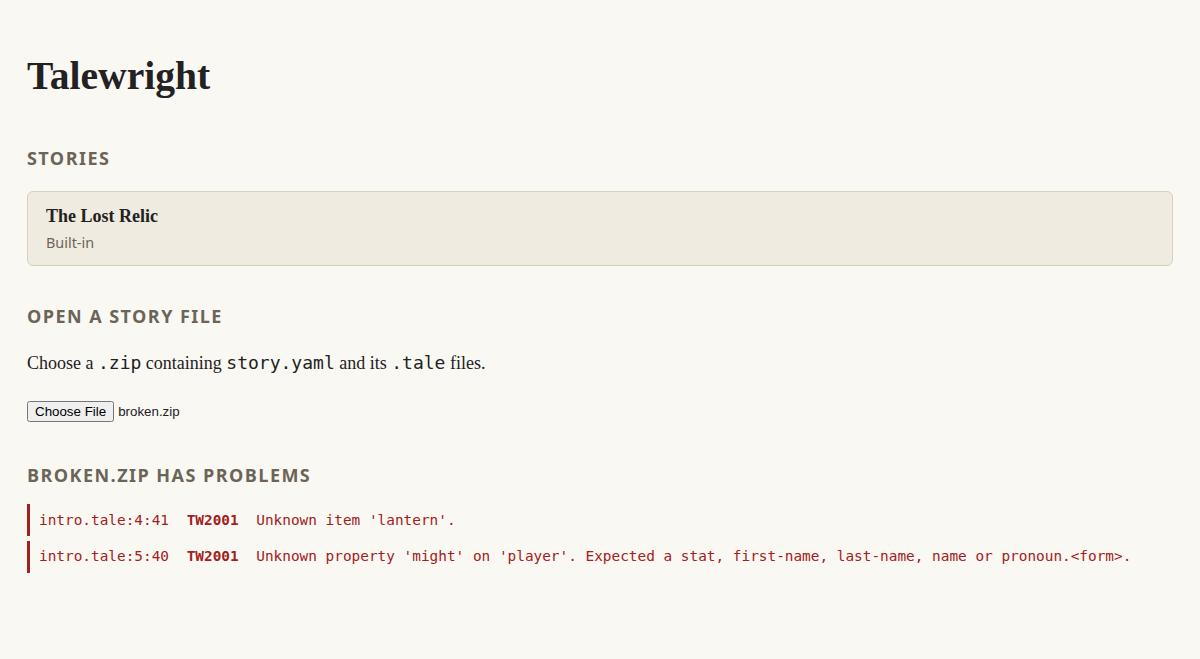
This screenshot shows two other common mistakes: an item that was never declared in
story.talewright.yaml, and a misspelled stat.
After each change, re-zip the folder, go back to the library and open it again.
4. Make choices matter
Right now Ada can pay with a coin she might not have, and nothing changes when she does. Replace the
two choices in dock with these:
* [Pay with your silver coin] (requires: player has coin) { take player coin } -> crossing
* [Talk your way aboard] skill-check persuasion dc 12
  success: -> crossing
  failure: -> stranded
(requires: ...)hides a choice unless its condition is true.{ take player coin }is an effect that changes the game when the choice is picked.skill-check persuasion dc 12rolls a d20, adds Ada’s persuasion bonus, and succeeds on 12 or more. The indentedsuccess:andfailure:lines say where each result leads.
Add the scene for a failed check:
=== stranded
@title Stranded

The ferryman pushes off without you. Maybe tomorrow.

-> END
5. Change the text based on what happened
In crossing, replace “The boat slides into the dark.” with:
The boat slides into the dark.
{if player has coin}You keep a hand on your coin the whole way.{else}Your pockets feel lighter.{/if}
{if ...} shows text only when its condition is true. {else} is optional.
Check the story again, then play both routes. The character sheet on the right updates as Ada spends her coin, and skill check results appear in the story as they happen.
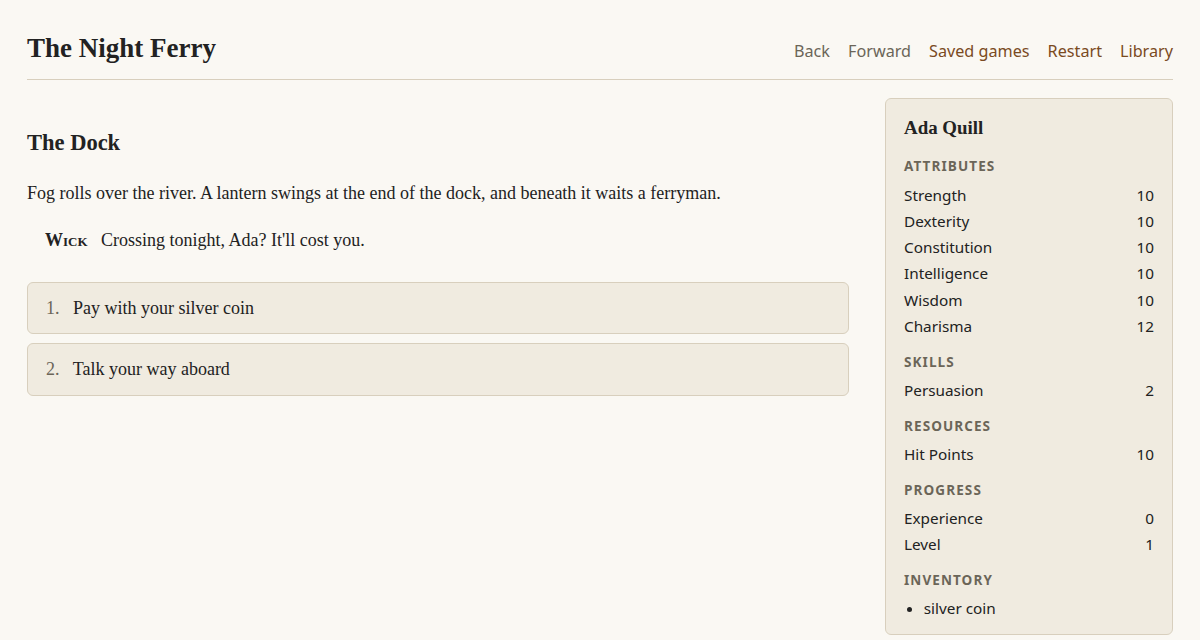
The finished story
Complete story.tale
```tale
=== dock
@title The Dock
Fog rolls over the river. A lantern swings at the end of the dock, and beneath it waits a ferryman.
> ferryman: Crossing tonight, {player:first-name}? It'll cost you.
* [Pay with your silver coin] (requires: player has coin) { take player coin } -> crossing
* [Talk your way aboard] skill-check persuasion dc 12
success: -> crossing
failure: -> stranded
=== crossing
@title The Crossing
The boat slides into the dark.
{if player has coin}You keep a hand on your coin the whole way.{else}Your pockets feel lighter.{/if}
-> END
=== stranded
@title Stranded
The ferryman pushes off without you. Maybe tomorrow.
-> END
```
Where next
- Writing stories: factions, hubs, triggers, character creation and more.
- Organizing your story: keep this simple layout or split related settings into smaller files.
- The Lost Relic: a bigger sample that uses almost every feature. Its README maps each feature to where it’s used.
- Testing your story: check your story without playing it, and jump to any scene.
These docs are maintained with the code in squid-farm/talewright. Found a problem? Open an issue.